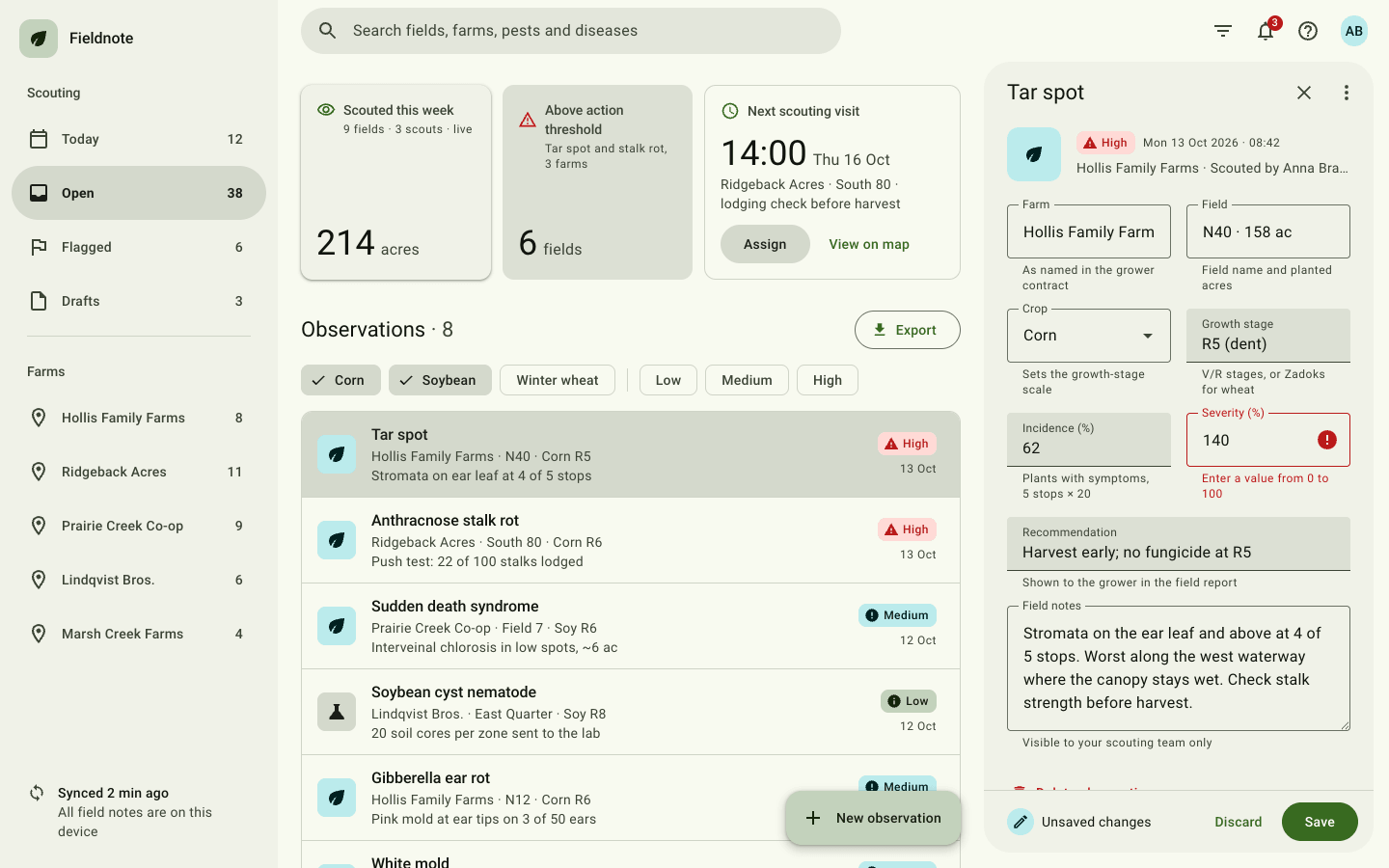
Create a Material Design 3 web application screen. Follow Google's system faithfully (tonal colour, shape scale, elevation, state layers and motion) and apply it to a real workflow.
Brief
Subject: Fieldnote — a crop-scouting web app agronomists use to log pest and disease observations across farmsPopulate every component with realistic data from this domain (names, dates, statuses, counts) so the app reads as a working product, not a component sheetIt is one app screen, signed in, mid-task: a list of records with one selected and open for editingDesign Tokens
Use these exact values. Where the spec is silent, stay consistent with them.
colors:
  accent: "#386a20"
  background: "#f8faf0"
  border: "color-mix(in srgb, #55624c 25%, #f8faf0)"
  error: "#ba1a1a, container #ffdad6"
  inversePrimary: "color-mix(in srgb, #386a20 55%, #ffffff)"
  inverseSurface: "color-mix(in srgb, #55624c 25%, #1a1a1a)"
  muted: "color-mix(in srgb, #55624c 70%, #000)"
  onPrimary: "#ffffff"
  onPrimaryContainer: "color-mix(in srgb, #386a20 35%, #000)"
  onSecondaryContainer: "color-mix(in srgb, #55624c 30%, #000)"
  outline: "color-mix(in srgb, #55624c 60%, #8a8a8a)"
  primaryContainer: "color-mix(in srgb, #386a20 30%, #ffffff)"
  secondaryContainer: "color-mix(in srgb, #55624c 22%, #f8faf0)"
  surface: "#f8faf0"
  surfaceContainer: "color-mix(in srgb, #55624c 9%, #f8faf0)"
  surfaceContainerHigh: "color-mix(in srgb, #55624c 13%, #f8faf0)"
  surfaceContainerHighest: "color-mix(in srgb, #55624c 17%, #f8faf0)"
  surfaceContainerLow: "color-mix(in srgb, #55624c 5%, #f8faf0)"
  tertiaryContainer: "#bbebec, on it #002020"
  text: "color-mix(in srgb, #55624c 20%, #000)"
effects:
  ripple: "a currentColor circle at 14% opacity scaling from 0 over 550ms with the emphasized easing, then fading"
  scrim: rgb(0 0 0 / 0.32) behind the modal drawer
  stateLayers: "hover 8%, focus 10%, pressed 10% of currentColor"
fonts:
  body:
    fallback: "system-ui, -apple-system, 'Segoe UI', sans-serif"
    family: Roboto
    weights: [400, 500, 700]
  display:
    fallback: "system-ui, -apple-system, 'Segoe UI', sans-serif"
    family: Roboto
    weights: [400]
layout:
  breakpoints:
    compact: 900px
    detailNarrow: 1024px
    form: 420px
    modalDrawer: 1280px
  container: "the full viewport: columns 288px / 1fr / 420px, rows 64px / 1fr, areas 'drawer bar bar' 'drawer main detail'"
  gutter: "24px inside the main column, 16px under 900px"
motion:
  durations:
    long: 300ms
    ripple: 550ms
    short: 200ms
  easings:
    emphasized: "cubic-bezier(0.2, 0, 0, 1)"
    emphasizedDecelerate: "cubic-bezier(0.05, 0.7, 0.1, 1)"
radii:
  card: 12px
  chip: 8px
  fab: 16px
  field: 4px
  full: 9999px
  pane: 28px
shadows:
  level1: "0 1px 2px rgb(0 0 0 / 0.3), 0 1px 3px 1px rgb(0 0 0 / 0.15)"
  level2: "0 1px 2px rgb(0 0 0 / 0.3), 0 2px 6px 2px rgb(0 0 0 / 0.15)"
  level3: "0 1px 3px rgb(0 0 0 / 0.3), 0 4px 8px 3px rgb(0 0 0 / 0.15)"
  level4: "0 2px 3px rgb(0 0 0 / 0.3), 0 6px 10px 4px rgb(0 0 0 / 0.15)"
spacing:
  cardPadding: 16px
  grid: "8px base; 12px between cards, 32px above the list head"
type:
  body:
    font: body
    lineHeight: 20px
    size: 14px; body-large 16px/24px
    tracking: 0.25px
    weight: 400
  caption:
    font: body
    lineHeight: 16px
    size: 12px
    tracking: 0.5px
    weight: 500
  display:
    font: display
    lineHeight: 44px
    size: 36px
    tracking: 0
    weight: 400
  headline:
    font: display
    lineHeight: 32px
    size: 24px
    tracking: 0
    weight: 400
  title:
    font: body
    lineHeight: 28px
    size: 22px; title-medium 16px/24px weight 500
    tracking: 0
    weight: 400
Style Rules
Colour roles only: primary, on-primary, primary-container, secondary-container, the surface-container ladder, on-surface, on-surface-variant, outline, outline-variant, tertiary-container, error and the inverse rolesElevation is tonal: higher containers are darker surface-container steps; real shadows only on the elevated card (level 1), FAB (3), menus and snackbar (2) and the modal drawer (1)Shape by component: 4px fields and snackbar, 8px chips and statuses, 12px cards, 16px FAB, 28px detail pane and search, full for buttons and destinationsThe M3 type scale in one family: display-small for figures, title-large for pane and list titles, title-medium for list headlines, body-medium for supporting text, label-large for buttons and chipsEvery interactive element has a state layer: a ::before in currentColor at 8% on hover, 10% on focus, 10% on press, plus a ripple on pressMotion: emphasized easing cubic-bezier(0.2, 0, 0, 1), 200ms for small changes and 300ms for panes, drawers and the FABPage Layout
full viewport, nothing scrolls but the main column and the pane body
┌ drawer 288px ──┐┌ top app bar 64px: [≡] (⌕ search ··················) ◯filter ◯bell• ◯? (AB) ┐
│ ▣ Name         ││┌ main (scrolls) ─────────────────────────────┐┌ detail pane 420px, 28px radius ┐
│ Scouting       │││ [elevated 214]  [filled 6]  [outlined task] ││ Record title         ✕  ⋮     │
│ (● Today    12)│││                                             ││ ▣ image · status · date        │
│   Open      38 │││ Observations · 38          [Export]         ││ ┌outlined┐ ┌outlined┐         │
│   Flagged    6 │││ (✓Corn)(✓Soy)(Wheat) │ (Low)(Med)(High)     ││ ▁filled▁▁  ▁filled▁▁         │
│ ────────────── │││ ┌ outlined card list ─────────────────────┐ ││ ┌select ▾┐ ┌error  !┐         │
│ Farms          │││ │ ▣ headline / 2 lines        [status] d │ ││ ┌notes ·············┐         │
│   Farm  ·  8   │││ │ ▣ selected (secondary-container)        │ ││                                 │
│                │││ │ ▣ … 8 rows                              │ ││ ● Unsaved   Discard  [Save]    │
│ ⟳ synced 2m    │││ └─────────────────────────────────────────┘ │└────────────────────────────────┘
└────────────────┘││                        [+ New observation] │  ← extended FAB
                  │└─────────────────────────────────────────────┘
under 900px: bar / main / 80px bottom navigation; the pane opens full screen
Sections
Top App Bar — Grid area 'bar', 64px, surface fill, padding 0 16px 0 24px; a menu button appears first under 1280pxContent:Search placeholder naming what can be searched in the subjectNotification count from the subjectComponents:Search bar: 48px tall, max 560px, full shape, surface-container-high fill, a leading search icon and the placeholder in on-surface-variant; focus lifts it to surface-container-highestIcon buttons: 40px circles with state layers (filter, notifications with a small error badge, help)Avatar on the far rightMobile: Under 900px the search collapses into an icon that expands the bar into a full-width search field with a back arrowMotion: When the main column scrolls, the bar fills with surface-container over 300msNavigation Drawer — Grid area 'drawer', 288px, surface-container-low, 12px padding, full height; the footer pinned to the bottomContent:Two groups of destinations from the subject (work views and places), 4–5 each, with countsComponents:Brand row: a 40px primary-container square with the product icon and the product name in title-mediumGroup headings in title-small, on-surface-variant, padding 18px 16px 10pxDestination: 56px tall, full shape, padding 0 24px 0 16px, 24px icon, label in label-large, a count on the right; the active one in secondary-container with on-secondary-container text, bold and a filled iconA 1px outline-variant divider between groups; the footer shows sync status with an iconMobile: Under 1280px a 300px modal drawer with a 16px trailing radius, elevation 1 and a 32% scrim, sliding in over 300ms. Under 900px an 80px bottom navigation bar on surface-container with four destinations, the active one under a 64×32px secondary-container pillCards — Grid area 'main', scrolling, 24px padding: summary row, then the list head 32px below, chips, then the record listContent:Three summary figures from the subjectA list head 'Observations' (or the subject's records) in title-large with a count and an outlined 'Export' buttonEight records with real names, places, dates and statusesComponents:Summary row: three cards in a grid with a 12px gap, at least 132px tall: an elevated card (surface-container-low, elevation 1) for the main live count, a filled card (surface-container-highest) for an alert figure, an outlined card (surface, 1px outline-variant) for the next scheduled task with card actions; each with a 20px icon and label at the top and the figure in display size at the bottom with its unit in body-largeRecord list: an outlined card containing 72px list items: a 40px tonal record image, the headline in title-medium, two lines of supporting text in body-medium on-surface-variant, and on the right a status (24px, 8px radius, tinted by status with a filled 16px icon) over the date; 1px outline-variant dividers; the selected item in secondary-containerStates:List items show the state layer on hover and focus, ripple on press, and open the record in the detail paneMobile: Under 900px the summary row becomes two columns with the third card spanning both; padding 16pxButtons — No row of its own: each button lives in the card, list head or detail footer where its action belongsContent:Filled 'Save' in the detail footer, disabled until something changesTonal 'Assign' and text 'View on map' as card actionsOutlined 'Export' in the list head; text 'Discard' and 'Delete' (error) in the detail paneComponents:Filled: primary fill, on-primary text, 40px, full shape, padding 0 24px, label-large; hover adds elevation 1Tonal: secondary-container fill with on-secondary-container textOutlined: transparent with a 1px outline and primary textText: primary text, padding 0 12px; a destructive text button uses the error colourDisabled: on-surface at 12% fill and 38% textMobile: Detail footer buttons stay right-aligned in the full-screen paneFAB — An extended FAB fixed 24px from the bottom-right of the main column: 56px tall, padding 0 20px 0 16px, 16px radius, primary-container fill, on-primary-container text in label-large, elevation 3 (4 on hover)Content:An add icon and the label 'New' plus the subject's record nameMobile: 16px from the edges, above the navigation barMotion: Scrolling down collapses it to a 56px icon-only FAB (the label's max-width animates to 0 over 300ms); scrolling up expands itChips — One row above the record list with an 8px gap, wrappingContent:Two groups of filters from the subject (for example crops, then severity), 3–4 chips each, two selectedComponents:Filter chip: 32px, 8px radius, 1px outline-variant border, label-large in on-surface-variant, padding 0 16px; selected: secondary-container fill, no border, padding-left 8px and an 18px check icon whose width grows from 0 over 200msA 1px × 24px divider between chip groupsStates:Toggling a chip filters the list and updates the count in the list headMobile: One horizontally scrolling row with hidden scrollbars, bleeding to the screen edgesText Fields — Grid area 'detail', 420px, margin 0 16px 16px 0, 28px radius, surface-container-low: a 64px header, a scrolling body (padding 0 24px 24px) with the summary and a two-column form of outlined and filled fields (16px gaps), and a footer with a 1px outline-variant top lineContent:Pane header: the record's title in title-large with close and overflow icon buttonsA record summary block: a 56px tonal image, the status and the dateEight fields from the subject's record, one of them showing its error stateFooter: 'Unsaved changes' with a tertiary icon on the left, Discard and Save on the rightComponents:Outlined field: 56px, 4px radius, 1px outline; the label sits inside and floats onto the border in body-small when focused or filled; focus turns the border 2px primary and the label primaryFilled field: surface-container-highest fill, 4px top radius, a 1px on-surface-variant bottom line that becomes 2px primary on focus; same floating labelSupporting text in body-small under each field; the error state turns the border, label and supporting text error-red with an error iconA select field with a trailing arrow and a multi-line notes fieldStates:Saving shows a snackbar: inverse-surface, 4px radius, inverse-on-surface text and an inverse-primary 'Undo' text button, rising 24px into placeMobile: 360px wide under 1024px; under 900px a full-screen view that slides in from the right over 300ms on surface, radius 0; the form goes to one column under 420pxImagery & Icons
Icons: Material Symbols Outlined from Google Fonts, 24px (18–20px in chips, buttons and stats); filled variant for the active destination and status iconsRecord images are 40–56px tonal containers (secondary or tertiary container) holding an icon for the kind of recordAvatar: a 32px circle with initials on the tertiary containerImplementation Notes
Use CSS custom properties named after the M3 roles (--md-primary, --md-surface-container-low…), the elevation levels and the shape scaleA small script handles chips, list selection, the form's dirty state, ripples, the FAB collapse, the drawer and the snackbarDon'ts
No component gallery, landing-page hero or marketing copy: it is one working app screenNo colours outside the tonal palette, and no gradientsNo shadows on ordinary cards, lists or the app bar: elevation is tonalNo icon set other than Material Symbols Outlined, and no emojiNo stock photos: record images are tonal containers with an iconNo fonts, colours, radii or shadows outside the design tokens and rules aboveNo sections, features or effects that this spec doesn't listNo placeholder copy (lorem ipsum, "Elevate your workflow"): every word comes from the subjectNo pill-shaped eyebrow labels above headings and no gradient text, unless this spec asks for themNo grid of identical icon cards: vary size and emphasis by importanceQuality Floor
Mobile-first and responsive from 360px to 1440px and wider, with no horizontal scrollingText contrast meets WCAG 2.1 AA: 4.5:1 for body text, 3:1 for large textSemantic landmarks (header, nav, main, section, footer), one h1, descriptive alt textEvery interactive element has hover, visible focus and active states and works from the keyboardHonour prefers-reduced-motion: keep opacity fades, drop movementTech Stack
Framework: HTML/CSS/JS — Deliver one self-contained index.html: styles in a <style> block, scripts in a <script type="module"> block, no build step.Styling: Vanilla CSS — Plain CSS. Declare every design token as a custom property on :root (--color-accent, --font-display, --radius-card…) and use only those properties for colours, fonts, radii, shadows and timing.Language: JavaScript — JavaScript as ES modules; no TypeScript.UI library: None — No component library: build every component from the design tokens.Motion: CSS only — CSS transitions and keyframes only, with durations and easings from the design tokens.Icons: Inline SVG — Inline SVG icons drawn for this style, with one stroke width and corner treatment across the page.Acceptance Checklist
The screen fills the viewport: drawer 288px, top app bar 64px, a scrolling main column and a 420px detail paneEvery colour is a role from the tonal palette, mixed from the three colour variablesCards are elevated, filled and outlined, each used for a different kind of contentFilled, tonal, outlined and text buttons each appear where they fit, never in a showcase rowFilter chips toggle with a check icon that grows in, and really filter the list and its countOutlined and filled text fields have floating labels, supporting text and an error stateHover, focus and press show the state layer at 8%, 10% and 10%; buttons, chips and list items rippleOnly the FAB, menus, the modal drawer and the elevated card cast shadows, using the elevation tokensUnder 1280px the drawer is modal, under 900px a bottom navigation bar replaces it and the detail pane opens full screenMotion uses the emphasized easing at 200–300ms and collapses to instant under reduced motion