Make It Less Generic: Testing the Follow-Up Prompt
We sent one AI landing page three different follow-up prompts. The vague one redesigned it; the named list did exactly what it said. Real outputs inside.
"Make it less generic" works better than its reputation, but you give up control: in our test it threw out the concept, rewrote an approved headline and kept the billing terms the model had invented. A self-audit follow-up, where the model first lists every choice it made by default, landed on the same new concept and also removed the invented claims. A named edit list changed exactly the seven things it named and nothing else. If you know what you dislike, name it. If you only know the page feels generic, ask for the audit first.
Key takeaways
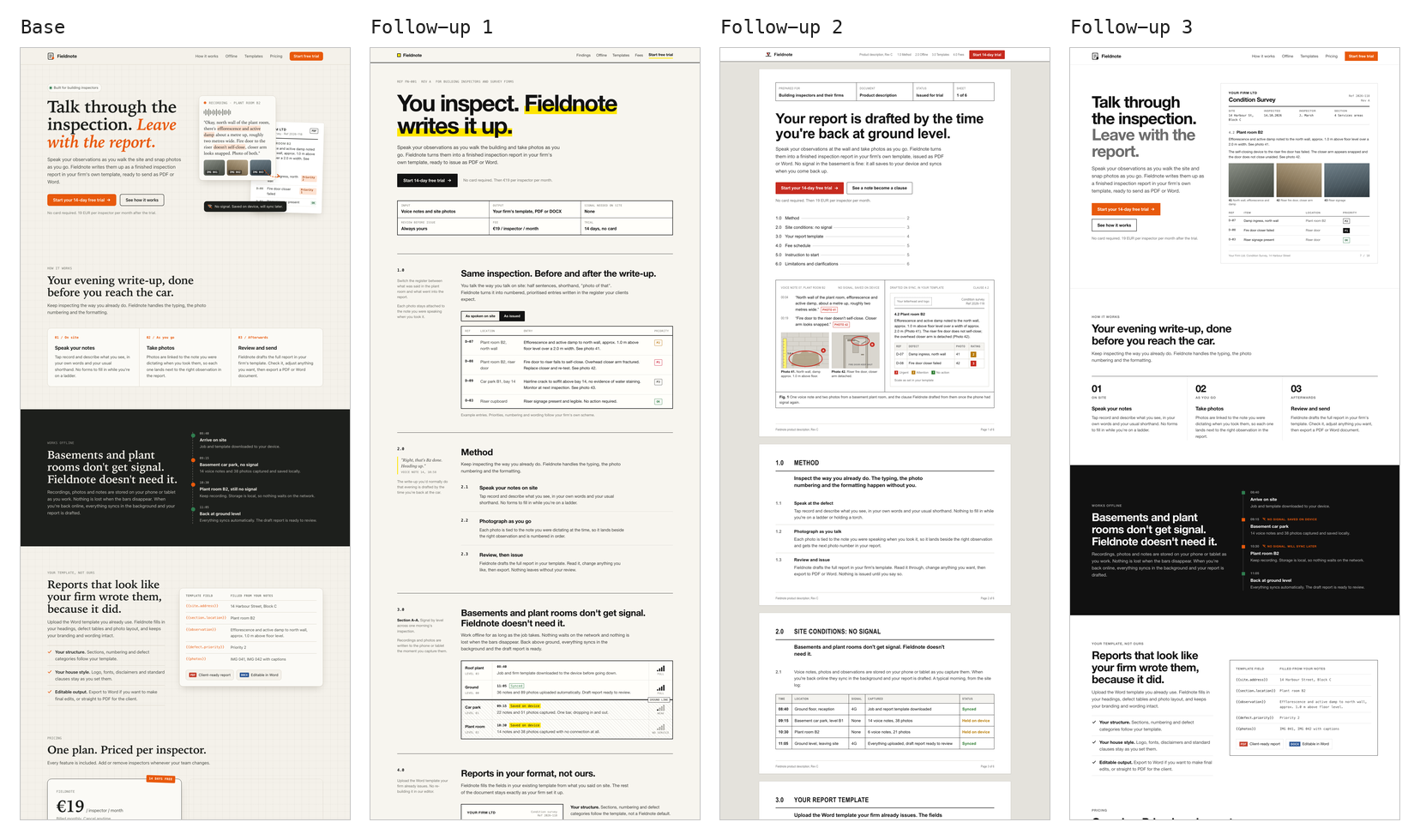
- The default AI landing page has moved on from purple gradients. Our base output was cream paper with a faint grid, serif headings with an orange italic phrase, a pill badge and a floating card collage.
- The vague follow-up produced a strong redesign, a page laid out like an inspection report. It also rewrote the headline and added one more made-up billing rule.
- The self-audit follow-up listed 24 defaults, including the invented "Cancel anytime" and billing-cycle terms, then removed them. Its design arrived at nearly the same report concept as the vague run.
- The named edit list was followed line by line. Everything it did not name survived, including uppercase section labels and the invented billing terms.
How did we test it?
We generated one landing page, then sent it three different second messages. Every output came from Claude Opus 5.5 in October 2026, each in its own session. Fieldnote is a product we invented for the test. The brief:
Build a landing page for Fieldnote, an app for building inspectors. Inspectors speak their notes on site, take photos, and Fieldnote turns them into a finished inspection report (PDF or Word, using the firm's own template). Works offline in basements and plant rooms; syncs when back online. Pricing: 19 EUR per inspector per month, 14-day free trial, no card required. Include a sign-up call to action. Deliver one self-contained HTML file.Each follow-up went to a fresh session holding the whole conversation so far: the brief, the base page as the assistant's first reply, and then the follow-up. So all three started from the identical base, and none could see the others. The full method and its caveats are in the test notes at the end.
What does the default AI landing page look like now?
Not the one you are braced for. There is no violet, no gradient text, no Inter.
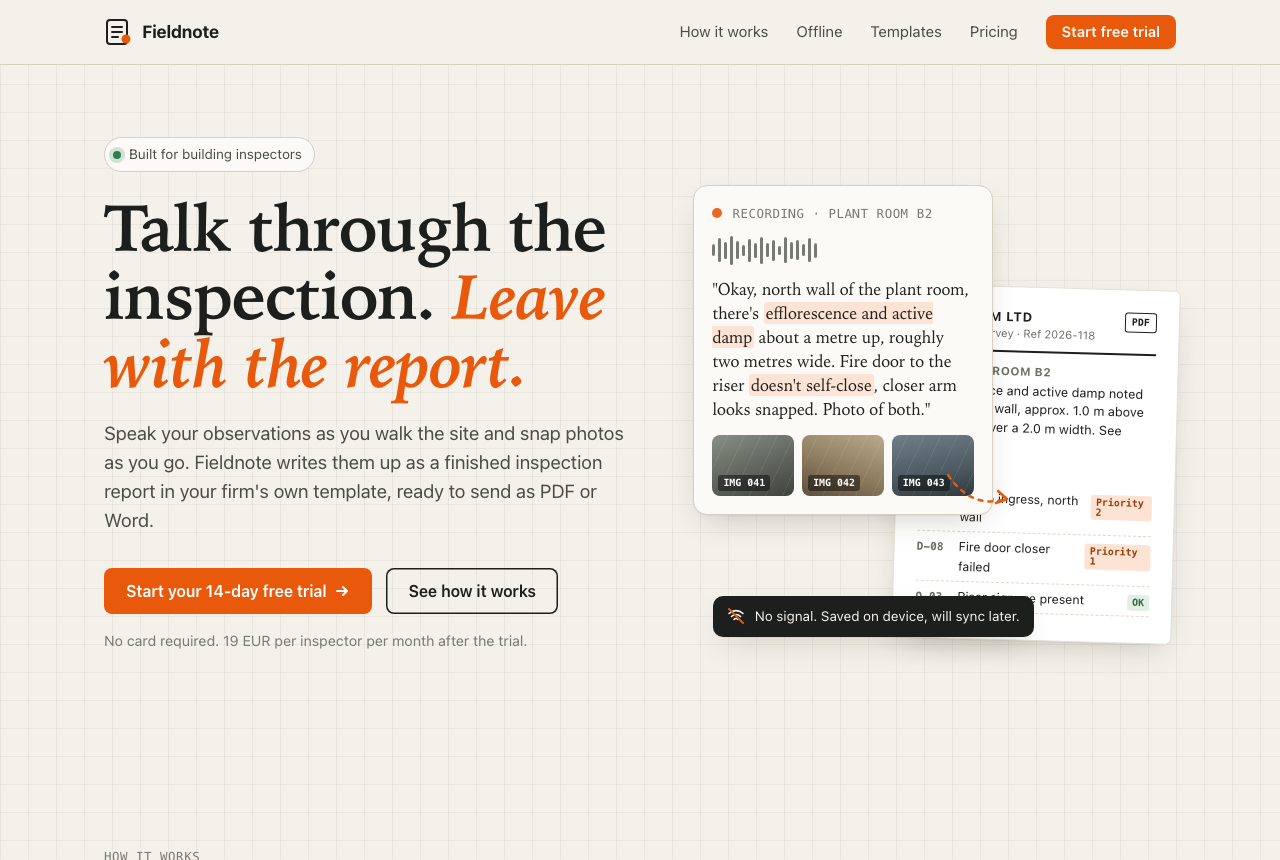
What it chose on its own: a cream background (#f4f1ea) with a 28px graph-paper grid, a Palatino-style serif for headings with the second half of the headline in orange italics, small uppercase monospace labels above every section, a pill badge with a green dot, and a hero made of overlapping rounded cards. The stylesheet has 23 border-radius declarations and 8 box-shadows. Further down: three step cards, a dark full-width band, a pricing card with a rotated "14 days free" stamp, an accordion FAQ.
It also added facts that were not in the brief: "Billed monthly. Cancel anytime." on the pricing card, and an FAQ answer saying the bill "adjusts from the next cycle". Nobody told it Fieldnote can be cancelled anytime.
This is the second-generation default. Anthropic's own prompting guide says models tend to "converge toward generic" output in frontend work, and its suggested fix steers away from Inter and purple gradients and toward atmospheric backgrounds and distinctive type. Their frontend design write-up explains the mechanism: models predict from patterns in training data, and safe choices dominate. Steering away from one safe choice tends to find the next one. We can't prove that is what happened here, but the result fits: the page avoids every item on the old list and lands on a new one. Our discarded first base run (see test notes) came back with the same headline, the same cream and orange, and the same serif.
What does "make it less generic" actually do?
It redesigns the page, and it decides what the redesign is. The follow-up, exactly as sent:
This looks too generic, like every other AI-made website. Make it less generic.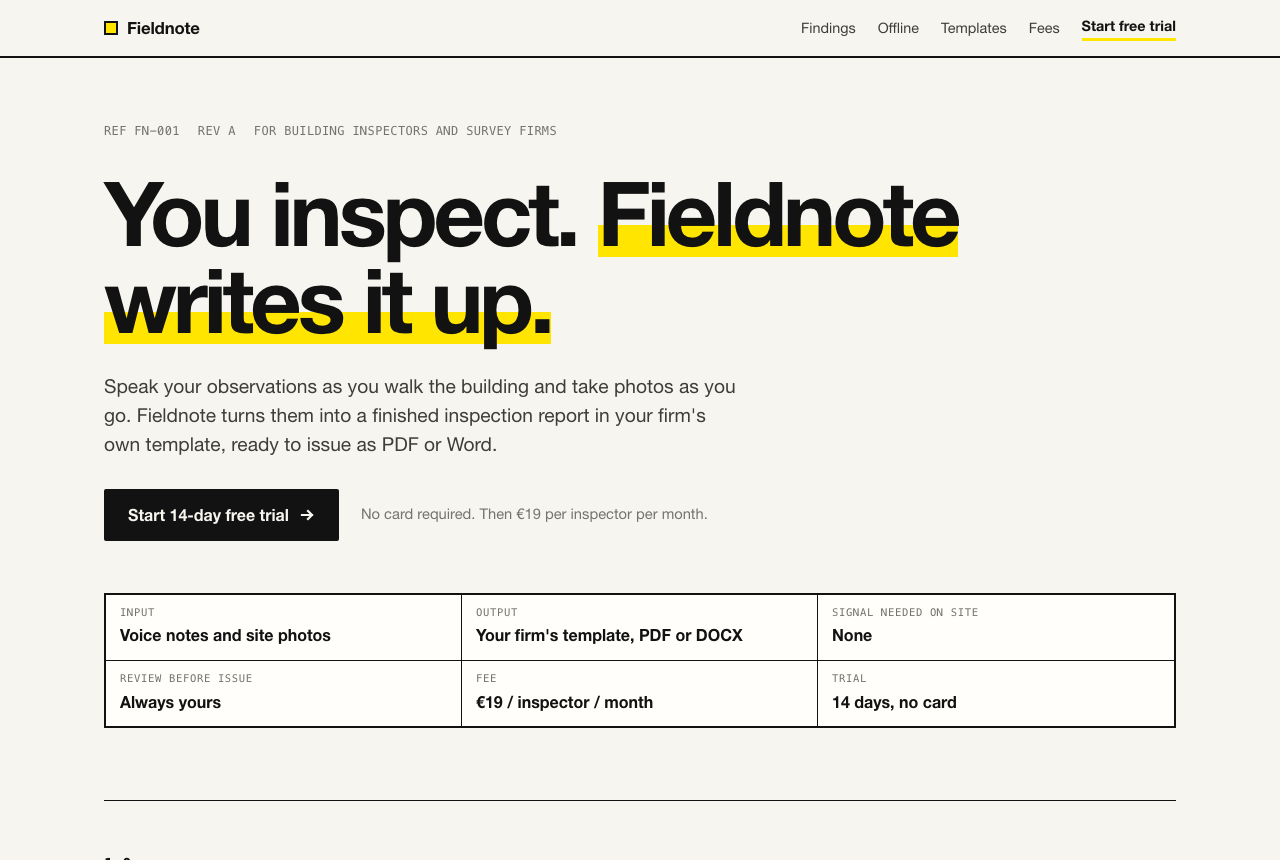
This is a better page than the base. The model picked a concept from the domain: the whole site is laid out like an inspection report, with numbered sections (1.0 to 7.0), a margin column for notes, a findings register with an "as spoken on site" and "as issued" toggle, a cross-section of the building showing signal dropping below ground, and a "Schedule of fees" set out like an invoice. Hi-vis yellow is used like a highlighter. The base had 23 border-radius declarations, up to 999px pills; this one has five, all 2px.
What you give up:
- The headline. "Talk through the inspection. Leave with the report." became "You inspect. Fieldnote writes it up." You asked about the look, and the copy changed too. If the headline had been approved, you now have to ask for it back.
- The invented terms stayed, and grew. "Cancel anytime" and "from the next cycle" survived, and the fee table added "Changes to headcount apply from the next billing cycle."
- New invented labels. "REF FN-001 REV A" in the hero and "Section A-A" in the margin are decoration borrowed from drawings. They look specific and mean nothing.
- Some reflexes survived. The page is still off-white (#f7f5ef) and still uses small uppercase monospace labels. A vague request removes the defaults the model notices. It does not remove the ones it does not.
What does a self-audit follow-up do?
It makes the model write down its defaults before it changes them, which gives you something to check. The follow-up:
Before you change anything, list every design choice on this page that you made by default rather than because the brief asked for it. Then rebuild the page, replacing each default with a choice that comes from building inspection itself: the sites, the paperwork, the working conditions. Keep every fact from the brief.The reply opened with a numbered list of 24 defaults. Most read like a design reviewer's notes on the base page: the "Do X. Get Y." headline with the second half in italic accent colour, the uppercase monospace labels over every section, the floating card collage, the priority pills in colours it had picked itself, the PDF and Word badges borrowed from Adobe and Microsoft colours. Then came a catch we had not asked for: it said "Cancel anytime" and the billing-cycle line were claims it had made up, and removed both.
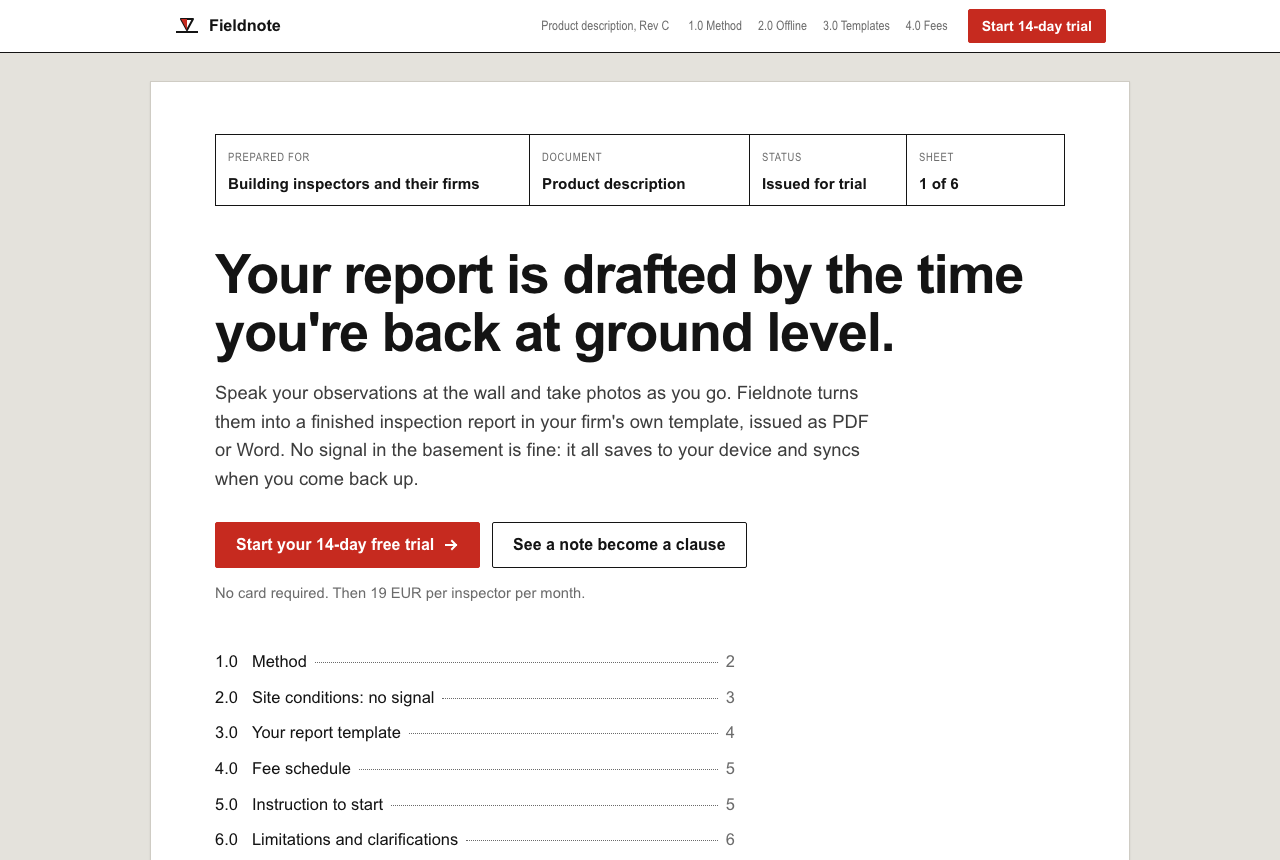
The design went to the same place as the vague run: the page is an issued report. Two sessions that could not see each other independently turned a generic landing page into a document, down to calling the sign-up section an "instruction" and closing with "End of document". The audit run went further into the domain: white sheets on a grey desk, Arial (its stated reason: that is what firms' Word templates are set in), red used as a markup pen, photos with defects circled, a site log table, and a datum-level marker as the logo.
Two problems. The headline, "Your report is drafted by the time you're back at ground level", is a product promise the brief never made; the brief says notes sync when back online, not that drafting is done by then. And the audit asked for 24 changes, so you still did not choose any of them. You can read what it decided, which is better than the vague run, where you can only diff the result.
What does a named edit list do?
Exactly what it says, and nothing more. We wrote this list after looking at the base page, the way a designer would mark up a first draft:
Change these things and keep everything else:
- White page. Remove the cream background and the graph-paper grid.
- No serif and no italics. One grotesque sans for everything; monospace only for report data.
- Remove the pill badge above the headline.
- The three step cards become one numbered row separated by hairline rules. No boxes.
- No rounded corners and no drop shadows anywhere on the page.
- Orange only on the sign-up buttons and the "no signal" status. Nowhere else.
- Replace the floating card collage in the hero with the finished report page itself, shown large and straight.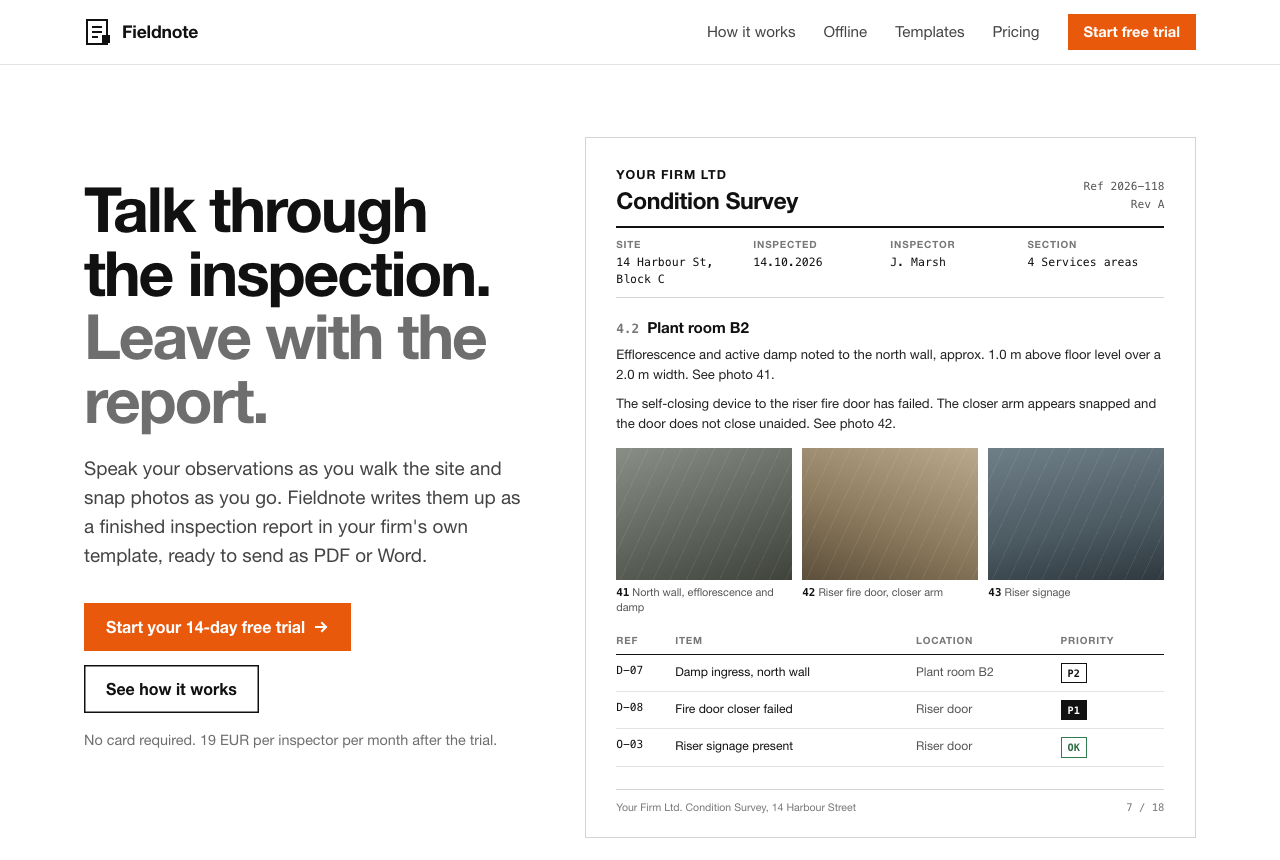
All seven changes landed. Every border-radius in the file is 0, the only remaining shadow is an inset outline, and the accent hex appears once, assigned to the buttons and the no-signal markers. The hero report page is the strongest element of any of the four runs, because it shows the product's output instead of describing it.
One judgment call: a finished report with a "no signal" chip on it made no sense to the model, so it moved the orange status to the offline section and said so in its reply. That is the right call, and it is the only liberty it took.
Everything we did not name stayed. The uppercase section labels are still there. The pricing card and the slider are still boxes. The dark band is still dark. "Billed monthly. Cancel anytime." is still on the pricing card, because "keep everything else" told it to keep it.
Which follow-up should you send?
The audit, then your own edit list. Read the 24 items, strike the ones you disagree with, and send the rest back as named edits. The audit finds defaults you would not think to name, including invented facts. The named list keeps you in charge of what changes. The vague ask is worth one try when you have no opinion yet, as long as you are willing to lose your copy along with the look. If you are writing the first prompt rather than the second, our style description test shows how to remove most of these defaults before they appear.
We tested the audit as a single message that also rebuilds the page. The version below stops after the list so you can edit it first. That split version is untested; the wording of the audit itself is exactly what we ran.
Before you change anything, list every design choice on this page that you made by default rather than because the brief asked for it. Include any facts, claims or terms that were not in the brief. Number the list. Do not change the page yet.Then reply with your edits in the shape that worked:
Change these things and keep everything else:
- [the default you want gone]. [what replaces it].
- [the next one]. [what replaces it].
- Remove these claims: [invented terms from the audit].
- Do not change any copy except where listed.
The last line is our addition after watching two of three runs rewrite the headline. It is also untested.
A good audit tends to end up describing a style you could have named in the first prompt. The Prompt Builder lets you set those choices up front, and every style in the prompt library is written as decisions, not adjectives. For why polished output makes invented details easy to miss, Nielsen Norman Group's piece on the aesthetic-usability effect explains how attractive design makes people overlook problems; the cream base page looked trustworthy enough that "Cancel anytime" read as policy.
Test notes: all four outputs generated by Claude Opus 5.5 in October 2026. Each output came from a separate session. The three follow-ups were sent as a conversation transcript (brief, the base HTML as the assistant's first reply, then the follow-up) to a fresh session, rather than as a live second turn, so all three branched from an identical base. Each session also received a one-line instruction naming the file path to save to. The sessions ran inside Claude Code in our own environment, which includes design plugins and a saved preference against three-part taglines, so they were not perfectly blank. Our first base run was discarded because a design-lint hook in that environment fed findings back to the model while it worked and it revised two details; the base shown was regenerated in a folder the hook ignores. One generation per prompt, no retries, no manual edits. The follow-up 2 session opened its own page in a browser and fixed a mobile alignment bug in its fee table before finishing; follow-up 1 tried and could not. We tested Claude only and make no claim about ChatGPT, v0 or other tools. Fieldnote, its firm names and its addresses are invented. Screenshots at 1280x860 in headless Chrome; no output loaded web fonts. Counts of radius and shadow declarations are from the generated CSS.