Dark Mode Website Prompt: One Line vs a Seven-Line Spec
One landing page brief, run twice: once with "use a dark mode design", once with a 7-line spec. Contrast measured on every text node. Real outputs inside.
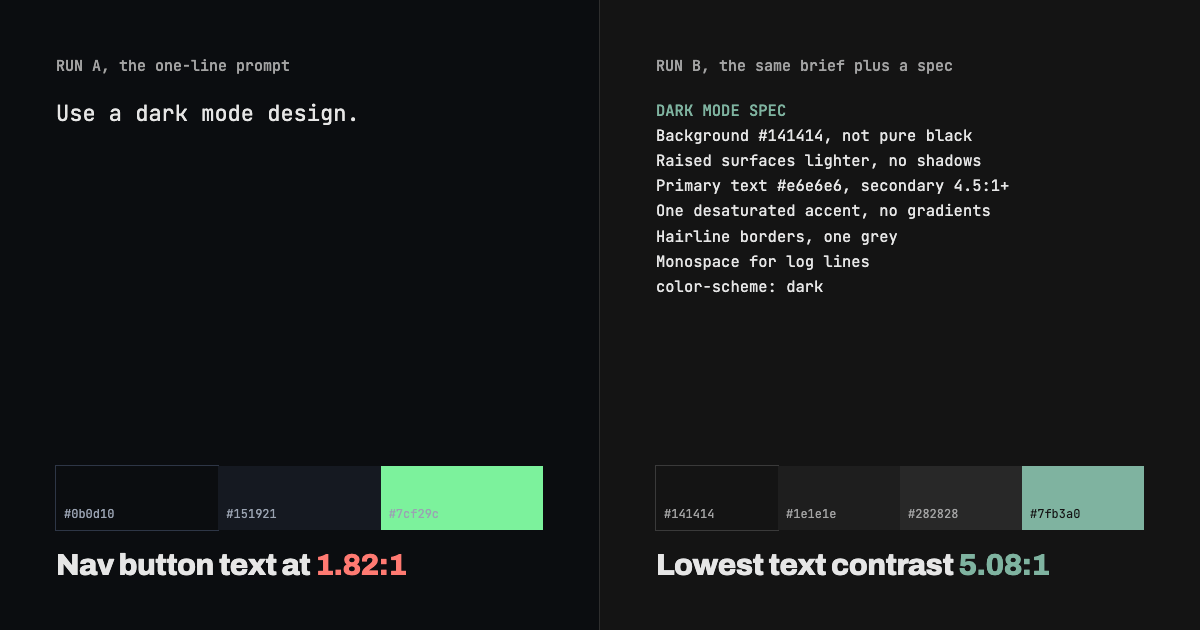
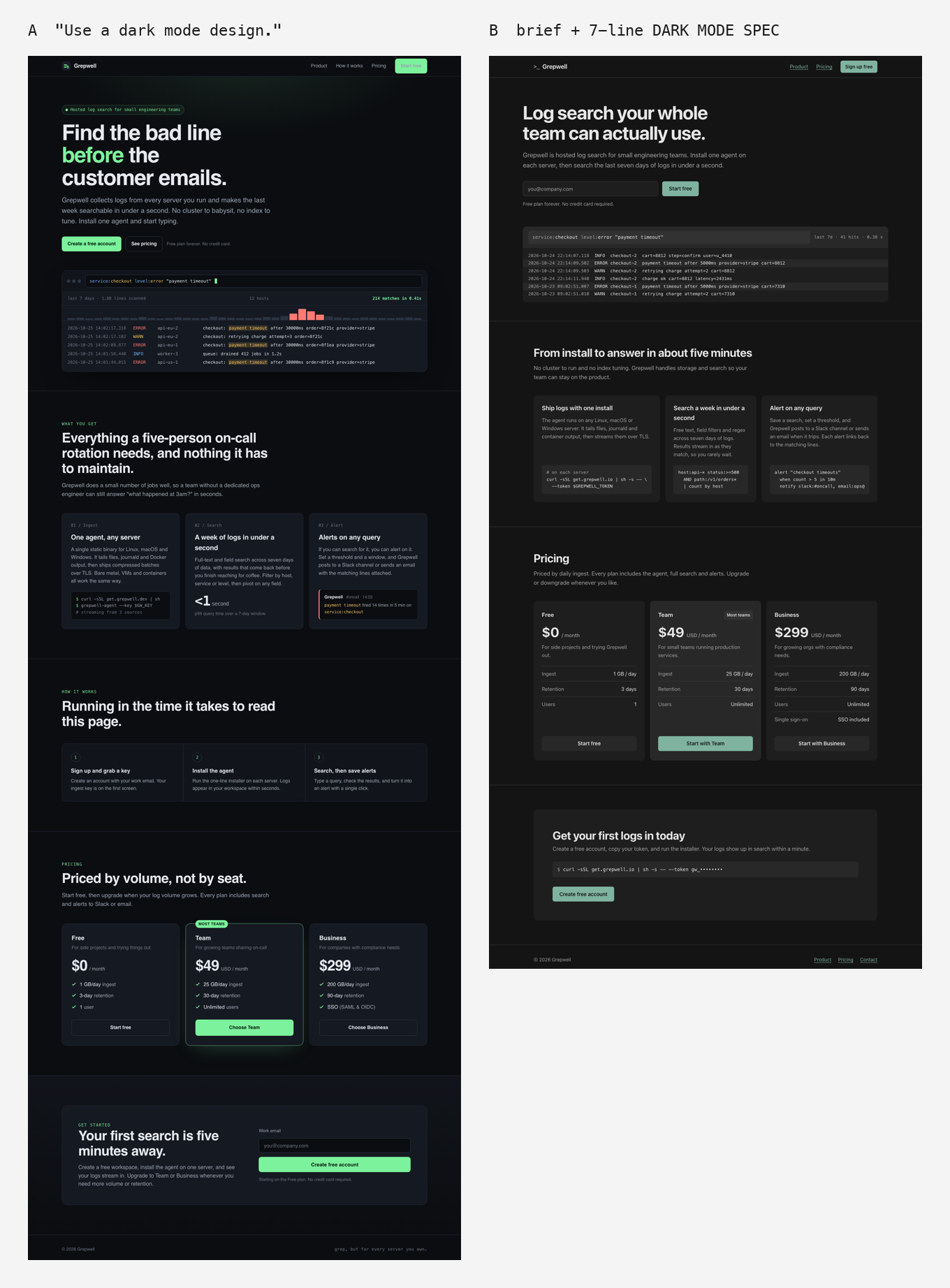
"Use a dark mode design" gets you a dark page, but it also gets you a blue-tinted near-black, a neon green accent, a glow behind the hero and three contrast failures, one of them a sign-up button you can barely read. Adding a seven-line spec to the same brief gave a neutral grey page with no text contrast failures and no shadows or gradients anywhere. The spec also caused one new problem: with "one accent color" in the prompt, the model dropped the red and amber that told ERROR lines apart from INFO lines. Dark mode is a set of decisions about surfaces and text color, and the prompt has to make them.
Key takeaways
- The one-line prompt produced #0b0d10 as the page color (blue channel highest) and #7cf29c bright green as the accent, plus a radial glow, a glowing pricing card and a gradient section.
- We measured contrast on every text node in both pages. The one-line version failed WCAG AA in three places, worst at 1.82:1 on its nav "Start free" button, caused by a CSS specificity bug.
- The spec version passed everywhere. Its lowest ratio was 5.08:1, and the model had written that number into a CSS comment itself.
- "One accent color" was read as "no other colors". Log levels lost their status colors. Status colors are data and need their own line in the prompt.
How did we test it?
One brief, two prompts, one generation each. Grepwell is a product we invented for the test. Both runs used Claude Opus 5.5 in October 2026, each in a fresh session that saw only the prompt plus one line telling it where to save the file. No retries, no manual edits to either output. Screenshots are 1280x860 in headless Chrome. The brief:
Build a landing page for Grepwell, hosted log search for small engineering teams. Ship logs from any server with one agent install, search a week of logs in under a second, and set alerts on any query that posts to Slack or email. Pricing: Free (1 GB/day, 3-day retention, 1 user), Team 49 USD/month (25 GB/day, 30-day retention, unlimited users), Business 299 USD/month (200 GB/day, 90-day retention, SSO). Include a sign-up call to action. Deliver one self-contained HTML file.Run A added one line under the brief:
Use a dark mode design.Run B added this block instead:
DARK MODE SPEC
- Background: neutral dark grey around #141414, not pure black. No blue or purple tint.
- Elevation: raised surfaces get lighter in 3 steps, about 4% lighter each. No shadows, no glows.
- Text: primary #e6e6e6, not pure white. Secondary text must pass 4.5:1 on every surface it sits on.
- Accent: one desaturated color, such as #7fb3a0, only on the main button, links and focus rings. No gradients.
- Borders: 1px hairlines in one neutral grey, only where they separate content.
- Log lines and code in a monospace font; everything else in one sans-serif.
- Set color-scheme: dark so form controls and scrollbars match.
Every spec line has a source. The grey-not-black and lighter-when-raised rules come from Material's dark theme: its Android documentation says dark grey "increases visibility for shadows and also reduces eye strain for light text", and that shadows have less contrast on dark backgrounds, so raised surfaces get lighter instead. The 4.5:1 floor is WCAG 2.1 SC 1.4.3 for normal-size text. The color-scheme property tells the browser to draw its own form controls and scrollbars in dark colors.
What does "use a dark mode design" produce?
A polished developer-tool page that follows the current dark SaaS template closely.
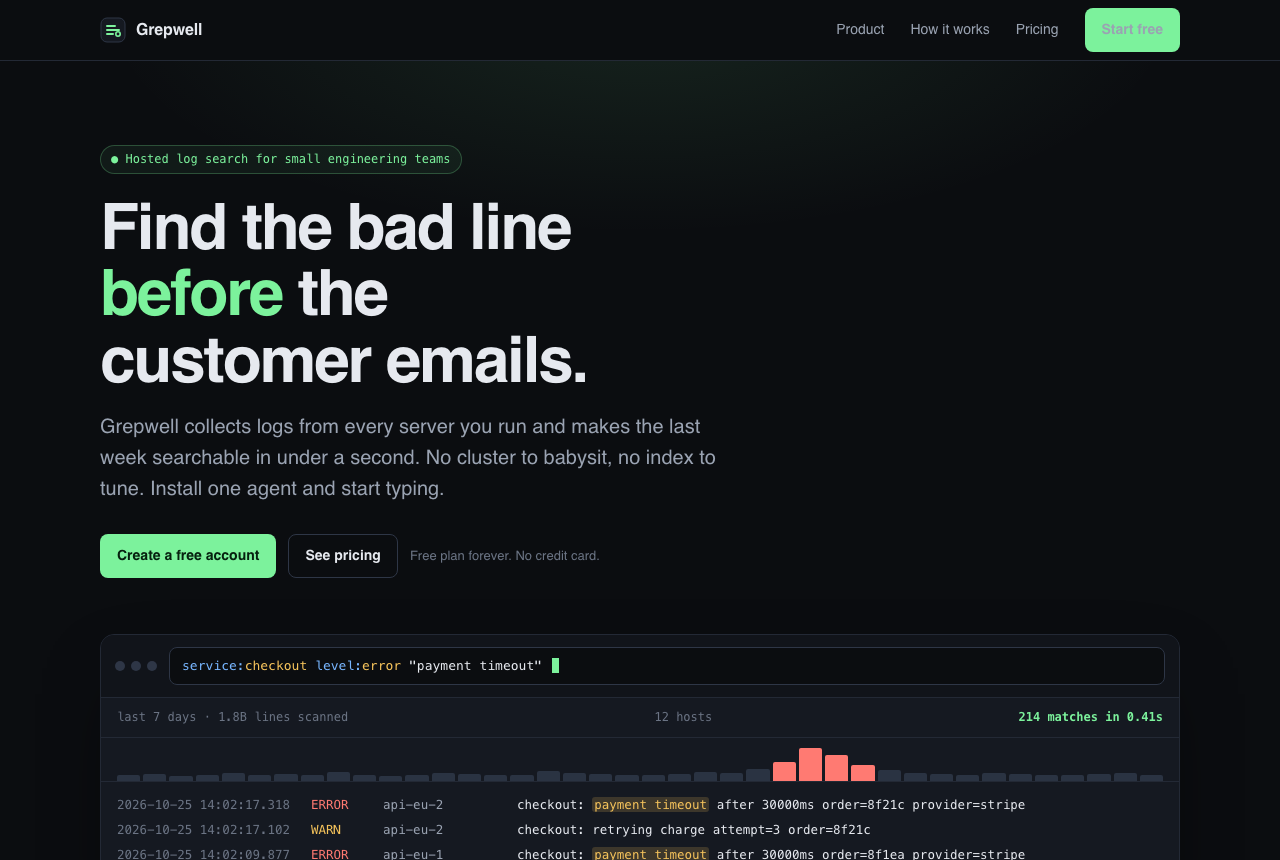
What it chose on its own:
- Surfaces: page #0b0d10, panels #151921, borders #232935. All three have more blue than red, so the page reads cold and slightly navy. That is the slate tint the Material guidance does not ask for.
- Accent: #7cf29c, a saturated mint green, on the headline word, the buttons, the pill badge and the match counter.
- Effects: a green radial glow behind the hero (built as a pseudo-element), a large drop shadow under the demo panel, a green glow around the recommended pricing card and a vertical gradient on the sign-up section.
- Template parts: a pill badge in the hero, an uppercase monospace label above every section ("WHAT YOU GET", "HOW IT WORKS", "PRICING", "GET STARTED"), and a "MOST TEAMS" pill on the middle plan.
The log panel is good. ERROR is red, WARN is amber, matches are highlighted, and there is a small histogram of matches over time. Of the two runs, this is the more convincing product mockup.
Where does the one-line version fail contrast?
We ran a script over every text node on both pages. It composites the text color over the real background behind it and computes the WCAG ratio. Run A failed in three places:
- Nav "Start free" button: 1.82:1. The button should have dark text on green. It has grey text on green, because the nav rule
.nav nav asets link color with higher specificity than.btn-primary. The model wrote the correct button color and then overrode it by accident. The hero buttons, outside the nav, are fine. - Dim grey #6b7484 on panels: 3.74:1, on 14 text nodes: the demo panel's timestamps and metadata ("last 7 days · 1.8B lines scanned"), the feature card numbers and the one-line plan descriptions.
- The same grey on the page background: 4.13:1, on 5 text nodes, including the "Free plan forever. No credit card." note next to the main call to action.
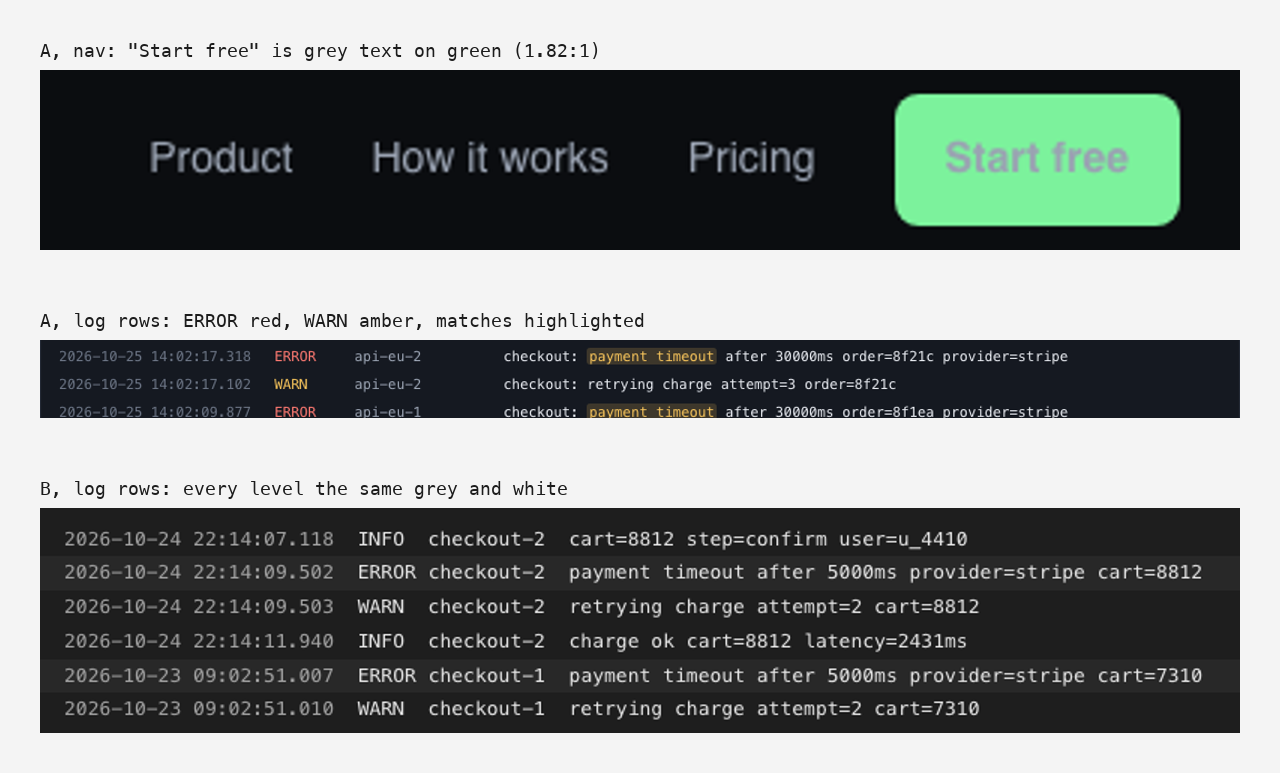
Two of these three are the classic dark-mode mistake. A third, dimmer text color looks fine on a designer's bright screen and drops below 4.5:1 the moment it sits on a raised panel. The one-line prompt never mentioned contrast, so nothing pushed back.
Run A did set color-scheme: dark on its own, so the spec's last line made no difference in this test.
What does the spec version produce?
A quieter page that does what the seven lines say, nearly to the letter.
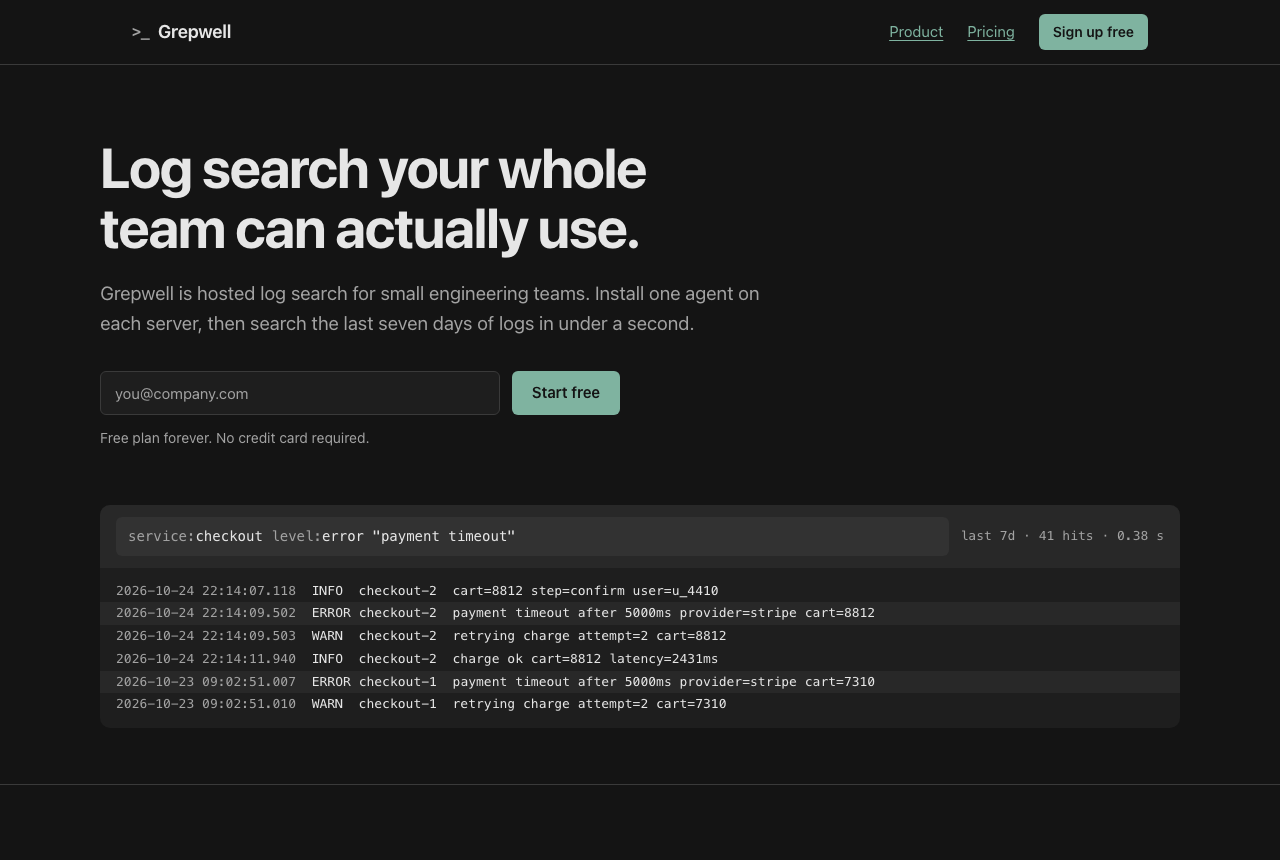
Measured from the generated CSS and the running page:
- Surfaces: #141414, #1e1e1e, #282828 and #323232. Each step is exactly 10 points lighter per channel, about 4% of the range. The model labelled them in comments as raised 1, 2 and 3.
- Text: primary #e6e6e6 as specified, secondary #a3a3a3. The CSS comment next to it reads "5.1:1 on --s3, higher on the rest". Our measurement gives 5.08:1 on the lightest surface, so the model checked the one surface that mattered.
- Effects: the CSS contains no shadows of any kind and no gradients.
- Accent: #7fb3a0, used for the buttons, nav links and focus outline. Dark text on it measures 7.77:1.
- Contrast failures: none, on any text node.
What did the spec get wrong?
Four things, and only one of them is the model's fault.
- Log levels lost their colors. In Run B, INFO, WARN and ERROR are all light grey. The only cue is that error rows sit on a slightly lighter background. On a log search product that is a real loss, and the spec caused it: "one desaturated color, only on the main button, links and focus rings" left no room for red or amber. The model read it as "one accent, nothing else" and complied.
- The example became the answer. "Such as #7fb3a0" was meant as a direction. The model used that exact hex. If you give an example color, expect to get it.
- Corners stayed rounded. Panels have 10 to 12px radii and buttons 6px. The spec said nothing about radius, so the model's default stayed.
- It still invented facts. Both runs did. Run B says the agent runs on "Linux, macOS or Windows" and gives an install command on a made-up domain. Run A added "1.8B lines scanned", a p95 query time and "SAML & OIDC" for SSO. None of that is in the brief. A dark mode spec does not touch content, and you still have to check every claim.
The fix for the first problem is a line that separates status color from accent color, for example: "Status colors are data, not accent: red for errors, amber for warnings, each at 4.5:1 on its surface." We have not re-run the prompt with that line, so treat it as untested.
Should a site be dark at all?
Only if the audience or the product suggests it. Nielsen Norman Group's review of the research found that for people with normal vision, light mode tends to give better reading performance. A log search tool is a fair case for dark: its users spend their day in dark terminals and editors. A recipe site or a law firm is not. When you are unsure, offer both themes and let prefers-color-scheme pick.
A dark mode spec you can reuse
Paste this under your own brief and fill in the brackets. It is Run B's block, with the accent made a choice instead of an example and the scope of the accent left to you.
DARK MODE SPEC
- Background: neutral dark grey around [#141414], not pure black. No blue or purple tint.
- Elevation: raised surfaces get lighter in 3 steps, about 4% lighter each. No shadows, no glows.
- Text: primary [#e6e6e6], not pure white. Secondary text must pass 4.5:1 on every surface it sits on.
- Accent: [one desaturated color], only on [the main button, links and focus rings]. No gradients.
- Borders: 1px hairlines in one neutral grey, only where they separate content.
- [Data, code or log lines] in a monospace font; everything else in one sans-serif.
- Set color-scheme: dark so form controls and scrollbars match.
Add a line for corner radius if you care about it, and a status-color line if your page shows errors, warnings or states. Our library's Dark Mode Premium App prompt is a full-page alternative with tweakable surface and accent colors. Note that it asks for a soft accent glow behind the hero, the effect this spec bans. If you would rather build your own block line by line, the Prompt Builder gives you the variables, and How to describe a design style to AI shows why named decisions beat adjectives.
Test notes
- Model: Claude Opus 5.5, run on 2026-10-25. Each output came from a fresh Claude Code session given only the prompt above and one line naming the save path. These sessions run in the site owner's Claude Code environment, which includes design plugins and saved preferences. The files were saved under an out/ folder, which the environment's design-lint hook skips, so no lint feedback reached either run.
- One generation per prompt. No retries, no cherry-picking, no edits to the HTML or the screenshots.
- Contrast was computed in Chrome with the WCAG 2.1 relative-luminance formula, compositing each text color over the actual background behind it. Large text (24px, or 18.66px bold) was held to 3:1 and everything else to 4.5:1. Hover and focus states were not measured.
- Neither page loads a web font. Both use system font stacks, so on a Mac they render in SF Pro and SF Mono.
- We did not check either page at mobile width, and we did not run the prompts in ChatGPT, v0 or any other tool.